Inventory and Warehouse Connected to the Business
Mantén el inventario al día, organiza compras y da visibilidad al almacén para que tu equipo venda y despache con más confianza.

Complete inventory and warehouse management
From product catalog to warehouse operations, everything stays connected to finance and purchasing.
Product Catalog
Manage products and services with pricing, tax rates, stock levels, and categorization in one unified catalog.
Multi-Warehouse
Track inventory across multiple warehouses and locations. Know exactly what's where and move stock between locations.
Purchase Orders
Create purchase orders, track receiving, and keep purchasing connected to providers, inventory, and finance.
Stock Analytics
Monitor stock levels, identify slow movers, track reorder points, and make purchasing decisions with real data.
Stock Adjustments
Record adjustments for damages, returns, or corrections with full audit trail and reason tracking.
SKU & Barcode Support
Assign SKUs and barcodes to products for faster identification, counting, and point-of-sale integration.
Your Entire Offering in One Place
Manage products and services with pricing, tax configuration, stock levels, and categorization. The same catalog feeds invoices, quotes, purchase orders, and POS.
- Products & Services
Track physical products with stock, or services without inventory needs — both in the same catalog.
- Tax Integration
Link products to ITBIS rates (18%, 10%, exempt) so invoices calculate taxes automatically.
- Categories & Organization
Organize products into categories for faster search, reporting, and inventory management.
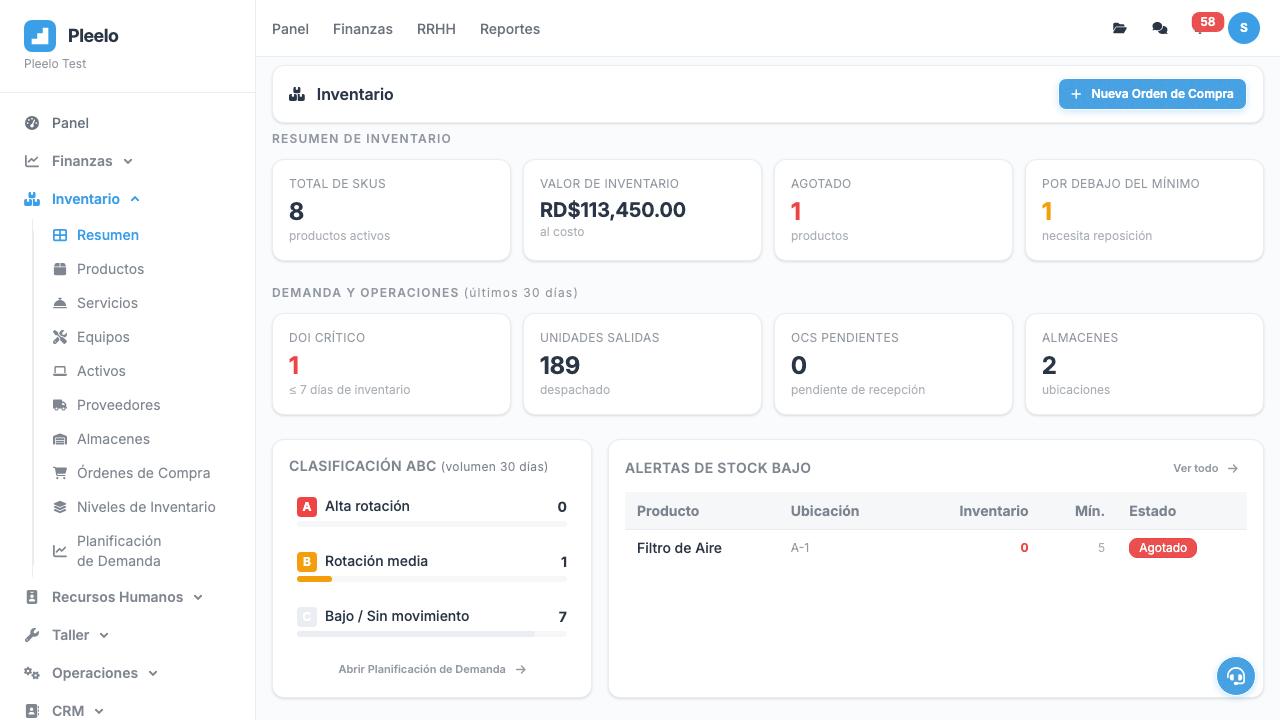
Inventory overview with stock levels
Multi-warehouse stock tracking
Multiple Warehouses, One View
Track stock across warehouses and locations. See real-time levels, identify low stock, and manage transfers — all from one dashboard instead of scattered manual tracking.
- Location-Aware Inventory
Each warehouse has its own stock counts, and the system aggregates the total view.
- Low Stock Alerts
Know when products drop below reorder thresholds so you can purchase before running out.
- Stock Movement History
Every entry, exit, transfer, and adjustment is recorded with date, user, and reason.
From Purchase Order to Received Stock
Create purchase orders, track them through approval and delivery, and receive stock directly into your warehouses. The whole flow stays connected to providers and finance.
Create PO
Select provider, add products, set quantities and prices
Send
Send PO to provider via email or print
Track
Monitor delivery status and expected arrival dates
Receive
Receive stock into warehouse with quantity verification
Reconcile
Match received goods against PO and update finance records
Why Workflow Continuity Matters
Cuando productos, almacenes, proveedores, compras y finanzas trabajan juntos, tu equipo comete menos errores y opera con más velocidad.
Take Control of Your Inventory
Stop guessing stock levels and chasing purchase orders across spreadsheets. Pleelo gives your team real inventory visibility connected to the rest of the business.